

ServiceNow Case Type Best Practices
By Ian Karash
When implementing Customer Service Management on your ServiceNow instance, cases are one of the main ways to track, manage and resolve customer issues, inquiries, or requests. Depending on your business, you can leverage the out-of-box (OOB) case, or you can create your own case types to better reflect your business needs. Like everything in ServiceNow, there are best practices to follow when implementing case types that ensure that you fully benefit from them. Creating a new case type requires a multitude of steps, so it is important to understand your business needs before deciding the OOB case isn’t enough.
Understanding Case Types
A case is the unit of work performed by agents to resolve a customer issue. Work can vary in many ways, including difficulty, duration, and type. Work also changes depending on the industry, enterprise, department, customer type, and channel. A new case type can be beneficial for an industry that offers multiple products, such as an internet service provider (ISP). An ISP offers different products such as internet plans and mobile plans, which can be represented by having their own case types. Within each product offered, there can be multiple services such as a personal plan, business plan, canceling a plan, and service outages.
Custom Case Types
A new case type is created by extending the Case table(sn_customerservice_case) as a new table and then setting up the necessary processes and components. A case type consists of four components: data model, view, process, and permissions. ServiceNow recommends following its best practices when creating new case types to ensure that you can use their OOB workspace functionality and maintain a lower total cost of ownership.
What are Best Practices?
With every implementation in ServiceNow, there are a set of best practices, which are actionable steps or processes intended to derisk your implementation on the Now Platform. Best practices usually have clear steps that demonstrate effectiveness based on real world implementations and use cases. Best practices are essential in a successful implementation and are proven to be effective and useful.
CSM Case Type Best Practices
Preserve the Base Case Table
Keep the baseline case table pristine to support future case types, rather than adding new case type fields directly to the baseline case table. If fields are added directly, they can be inherited to child tables.
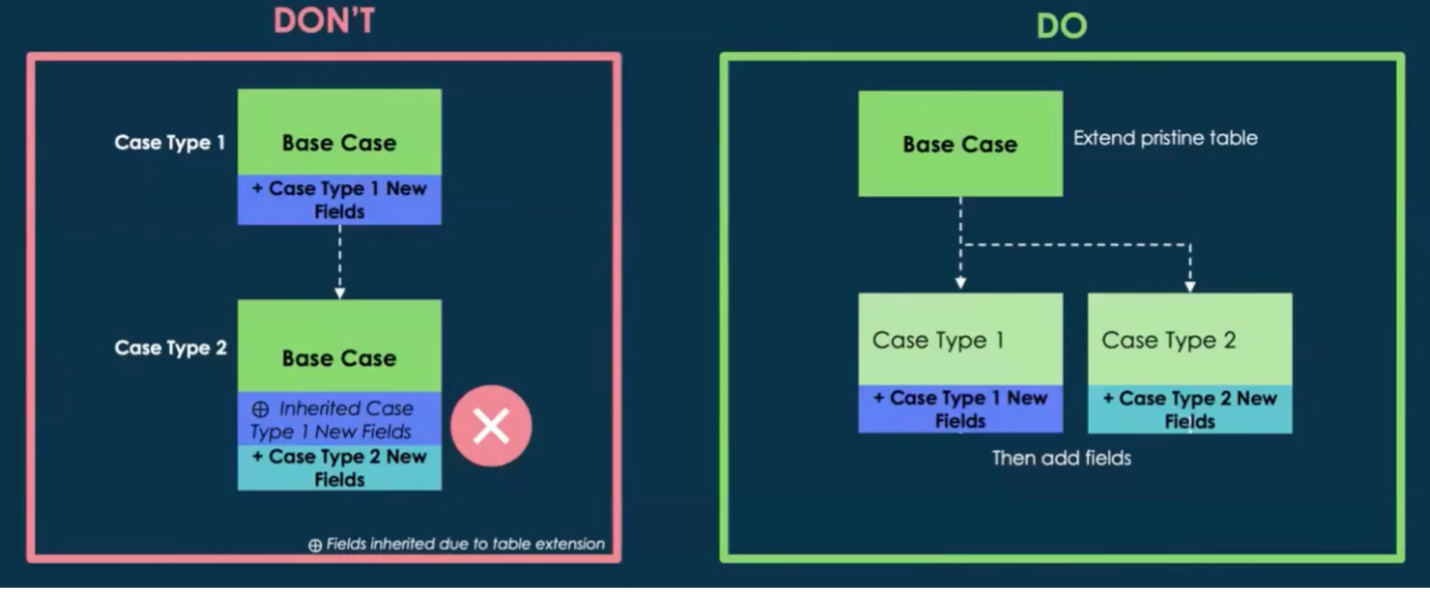
2. Create an Organization Level Case Table for Substantial Field Inheritance
If you need multiple case types, it is recommended to inherit from the base case table and create your unique case type fields directly within the new case type table. If you have a substantial amount of common case fields that need to be inherited, then create an organization-level case table that extends the base case table. This allows the substantial number of common fields to be inherited by all case types, while still allowing for unique creation of fields within each specific table.
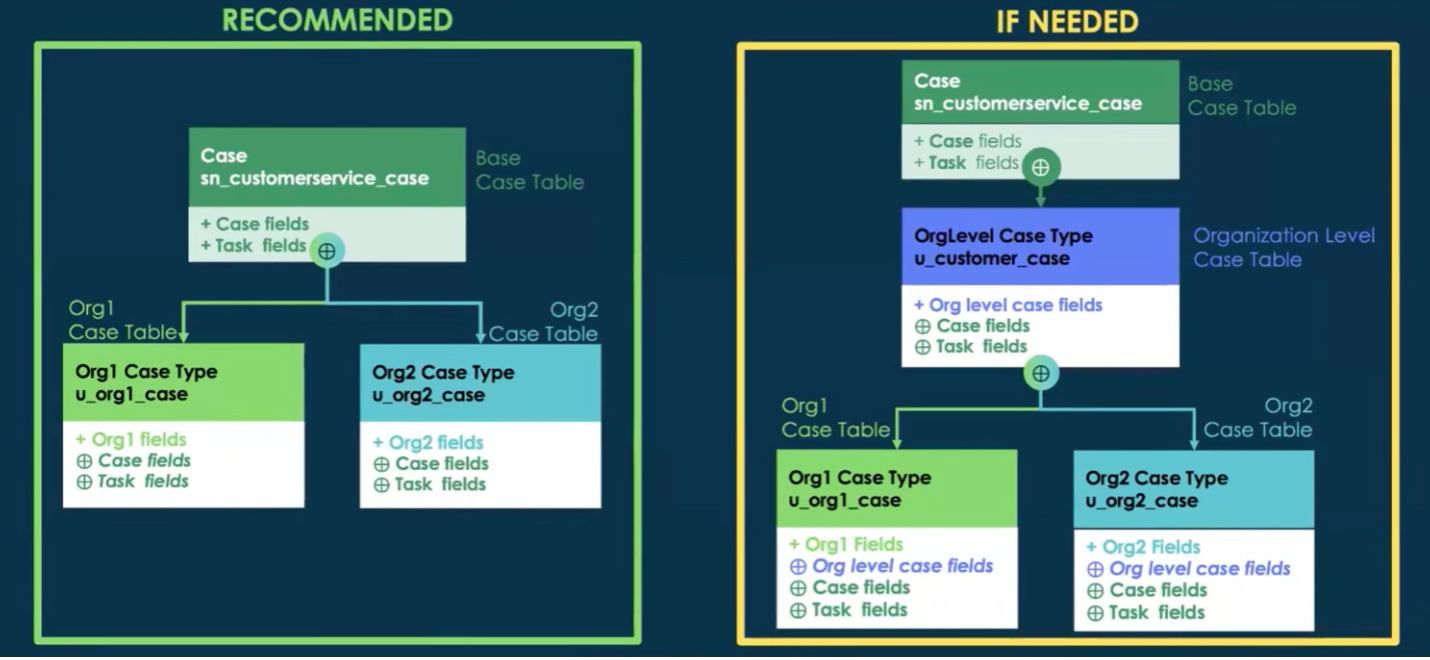
3. New Distinct Case Types Should Go in Their Own Scoped Application
This does not mean every case type needs its own scoped application. When designing case types, there should be logical groupings that can all be placed in a single scoped application. This does mean that you should not add new case types to one of the OOB scoped applications.
4. Create Granular Roles and Internal Personas for New Case Types
When creating new entities in ServiceNow, ACL’s need to be created to maintain data security and ensuring that users can only interact with the information they are authorized to access. Below is a list of recommended roles, as well as common personas.
Roles:
Viewer
Creator
Writer
Report Viewer
Common Internal Personas:
Fulfiller – Case type agent
Contributor – Case type account contributor
Common External Personas:
Requestor – Case type contact, case type partner
Contributor – Case type customer
5. Leverage Service Definitions to Minimize Case Types
With the Customer Service Case Types (com.snc.csm_case_types) plugin, you can group many services into a single case type. This allows agents to directly select the service for the customer or provide a filtered set of services for customers based on their sold products.
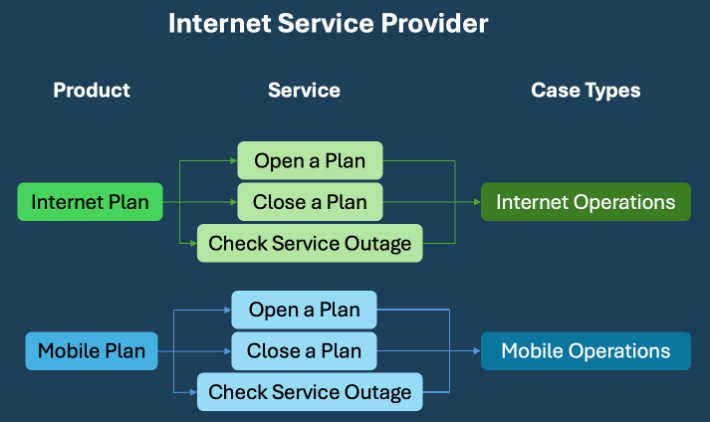
6. Use One Workspace for All Case Types
Implementation does not require you to have multiple workspaces per case type, so it is recommended to use one workspace. Creating additional workspaces means:
Additional implementation time
Cloning of necessary pages and maintenance in each workspace
New capabilities in CSM configurable workspace won’t be available in new workspaces
Advanced work assignment will not work across new workspaces
Higher total cost of ownership
Thoughtfully designing custom case types when implementing CSM ensures your solution aligns with business needs while remaining scalable and maintainable. By following best practices and leveraging OOB capabilities wherever possible, you can reduce complexity, control costs, and set your business up for long-term success.
Sources
ServiceNow. (2022, May). Best practices to implement case types [White paper].
ServiceNow Community. (2024, February 29). Explore best practices for using CSM case types [Video]. YouTube. https://www.youtube.com/watch?v=56IAivbwCK4
ServiceNow Documentation. (2025, July 30). Customer service case types. https://www.servicenow.com/docs/bundle/zurich-customer-service-management/page/product/customer-service-management/concept/customer-service-case-types.html